FireGL
Dec 2024 - Jan 2025
- C++20
- OpenGL
- CMake
- GLFW
Why build a renderer
I started programming through Roblox, and later worked with Unreal Engine. FireGL came after that: I wanted to see what sits below the engine abstractions: how a window gets an OpenGL context, how vertices become draw calls, how shaders and textures are bound, and how a scene is submitted every frame.
The first version of the OpenGL and shader code followed LearnOpenGL. A lot of the project is custom, but that guide was the starting point for the rendering pipeline.
I set it as a final personal project with a two-month deadline. At the time, C++ was my first real language, and I had been working with it for about a year (I had written some Luau before, but nothing complicated, and I did not really understand the code).
FireGL is a learning project, not a production engine. The goal was to make a library small enough to read, with an example application that exercises the full path from model import to pixels.
What FireGL does
FireGL is a C++20 static library for rendering 3D scenes with OpenGL. It provides:
- GLFW window creation, input handling, and time tracking.
- A scene container with objects, cameras, transforms, and lifecycle hooks.
- An entity layer with a small component system.
- Model import through Assimp, including materials and textures.
- Shader compilation, uniform helpers, and reusable material classes.
- 2D textures and cubemap skyboxes through STB Image.
- Instanced rendering with a dynamic matrix buffer.
- Debug rendering modes for wireframe and solid fill.
The example application loads a backpack model, a wood texture, a cubemap skybox, and 15 cube objects used as point lights. It runs on Windows, macOS, and Linux.
The frame loop
The example keeps the loop explicit:
while (!MainWindow.ShouldClose())
{
  MainTimer.Update();
  Input.ProcessInput();

  MainScene.Process();
  SceneRenderer.Render(&MainScene);

  Input.FinalizeInput();
}
Each manager has one job. The core managers register in SystemManager, a type-indexed static map, so any part of the library can retrieve the active window, input, time, or asset manager without threading them through every call. TimeManager reads glfwGetTime() and produces a delta time. InputManager tracks key states and invokes registered callbacks. Scene::Process updates the active camera and ticks every object with the current delta. The renderer clears the frame, batches objects, uploads matrices, draws, and renders the skybox last. FinalizeInput swaps buffers and polls GLFW events.
The order matters. Input is processed before the scene update, so movement and camera changes are applied in the same frame. Matrix upload happens after all transforms are updated. The skybox is separated from the normal batches because it needs a different depth setup and should not be part of instanced geometry.
The example uses a free-fly camera like an editor viewport rather than a game camera. W, A, S, and D move through the scene, the mouse looks around, and the scroll wheel changes movement speed.
Scene objects and components
SceneObject is the common base for anything that can be placed in a scene. It owns a Transform, stores its owning Scene, and requires derived classes to implement Render, Tick, BeginPlay, Destroy, SetMaterial, GetMaterial, GetMeshes, and GetHash. You will recognize some of those names if you’ve worked with Unreal Engine.
Entity wraps a Model or Shape through a std::shared_ptr<SceneObject> and forwards rendering and lifecycle calls to it. It also owns components in an unordered_map keyed by typeid(T).hash_code(). Components have OnBeginPlay, OnTick, and OnDestroyed, plus a pointer to their owner.
That gives the library a simple ECS-like shape:
auto entity = std::make_unique<fgl::Entity>(model);
auto* health = entity->CreateComponent<HealthComponent>();
Only one component of each type can be attached at a time. The storage is an unordered_map of unique_ptr values, so components are individually allocated and can end up anywhere in memory. That is easy to use, but it is not data-oriented.
Building this made me understand what a cache-friendly ECS is trying to do. If a system updates thousands of components every frame, it should read their data from contiguous arrays so the CPU touches as few cache lines as possible. Here, looking up a component and following its pointer already costs memory access before any work happens. A proper implementation would store component data in packed arrays and iterate over those arrays in systems, which is much harder to design but is the direction performance-focused engines take.
Instanced rendering
The renderer groups objects by the hash of their mesh data. BaseMesh::ComputeHash hashes the vertex count, vertex positions, and index list. Objects with the same hash end up in the same batch.
Each batch is drawn with glDrawElementsInstanced. The renderer stores two glm::mat4 values per object, one for the model-view-projection matrix and one for the model matrix. It uploads them through a dynamic OpenGL buffer and configures vertex attributes 3 through 10 for instancing, with a divisor of 1 so the matrices advance once per instance.
The matrix buffer grows by doubling its capacity when the scene needs more room, which avoids reallocating every frame. A first pass creates the VAO, VBO, and EBO and configures the normal vertex attributes. A second pass adds the instance matrix attributes. The first pass only runs when an object is new.
The skybox is kept out of the normal batch list. It is rendered after the scene with GL_LEQUAL as the depth function, then the previous depth function is restored.
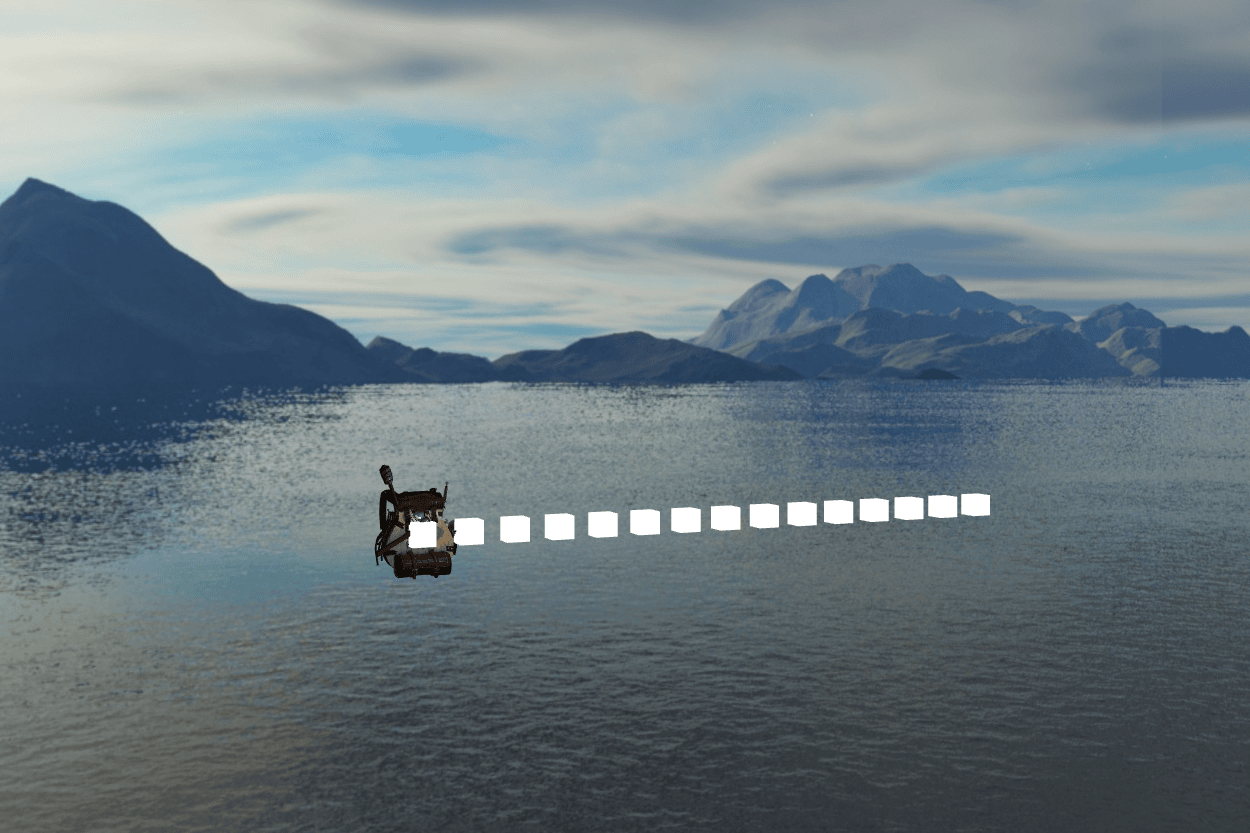
The example scene: the backpack model, the point-light cubes in a row, and the cubemap skybox.
Assets, shaders, and materials
AssetPathManager reads keys from Config.ini and resolves them relative to the config file. Paths can reference keys defined earlier, so Models=Assets/Models and BackpackModel=Models/Backpack/backpack.obj work together. Every resolved path is checked with std::filesystem::exists, and a missing key or file fails immediately instead of producing a broken texture or model later.
Model uses Assimp with triangulation, flipped UVs, and mesh optimization. It walks the imported node tree recursively, converts each mesh into the library’s Vertex format, and loads material textures. Textures are cached by file path so two meshes that share a texture do not upload it twice.
Shader compiles and links GLSL files and exposes typed setters for uniforms. Uniform locations are cached by name, which avoids calling glGetUniformLocation every frame. Material combines a shader with a map of texture names to texture pointers. LightingMaterial applies directional, point, and spot light uniforms. SkyboxMaterial deliberately removes the camera translation from the view matrix so the skybox appears infinitely far away.

The backpack model up close, with its textures and the scene lighting applied.
Build and dependencies
BUILD_EXAMPLE is off by default, so FireGL can be installed as a static library without the demo. The example target gets the asset root through a compile definition and links against the same library target a user would link.
GLFW ships prebuilt binaries for Windows and macOS. There are no prebuilt Linux binaries, so Linux fetches GLFW 3.4 and builds it. Assimp is handled differently. Its public headers are checked into extlibs/include/External/assimp, and CMake fetches the Assimp source from GitHub during configuration.
What I took away
Building it also made me much more comfortable with automatic memory management and ownership. I learned where std::unique_ptr and std::shared_ptr make sense, how ownership affects object lifetime, and why non-owning references or weak_ptr are often safer than raw pointers. Unreal Engine often avoids standard smart pointers in performance-sensitive code because the overhead is not free, and a lot of engine code manages memory more directly. For a learning renderer, automatic ownership was the right trade-off because it made the code safer.
It also taught me not to abstract before I have a second use case. The singleton managers are fine, and the component layer is simple enough. The rendering pipeline is where I overdid it. I wrapped so much of OpenGL behind SceneObject, Entity, Model, Shape, BaseMesh, Material, and Renderer that simple low-level work became awkward. If I wanted to modify a mesh’s vertices or indices, or issue a direct OpenGL call, there was no clean path to do it without bypassing several layers or changing multiple classes. The wrappers made the common path readable, but they hid the flexibility a renderer needs. A flatter rendering path with easier access to mesh data would have been better.
FireGL was also the first time I had to wire several external libraries into one build. I learned how CMake targets, include paths, static and shared libraries, and post-build file copying fit together, and how much platform-specific work that can involve. CMake is powerful, but it is not simple.
FireGL gave me a much clearer picture of what engines hide. It is not a production engine, but it does what I wanted it to do: it turns the graphics pipeline into code I can read, change, and explain. I also came away with a lot of respect for graphics programmers: C++ is still one of my favourite languages, but rendering is not the area I want to build a career in.